

Low-Inventory Fee
See which products are exempt from Amazon's low-inventory-level fee, per marketplace, right in the Inventory Overview.
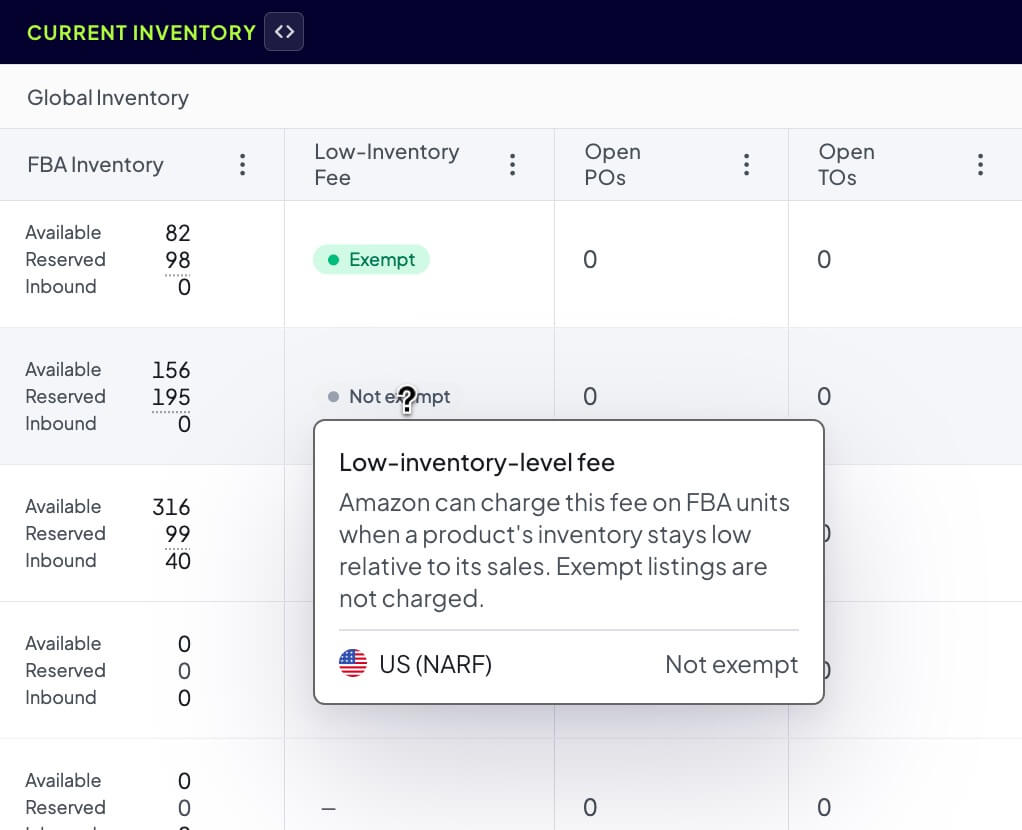
Amazon can charge a low-inventory-level fee on FBA units when a product's inventory stays low relative to how fast it sells. Some listings are exempt from it. The Low-Inventory Fee column in the Inventory Overview surfaces Amazon's exemption status for each product, so you can see which products are exposed to the fee without checking Seller Central listing by listing.
You will find the column in the Current Inventory group of the Inventory Overview table.
Reading the column
Each product shows a single badge that rolls up its exemption status across every marketplace you sell in.
| Badge | What it means |
|---|---|
| Exempt | Every marketplace that reported data is exempt from the fee. This product is protected. |
| Not exempt | No marketplace is exempt, so the product is eligible for the fee if its inventory runs low. |
| Mixed | The product is exempt in some marketplaces and not in others. Hover to see which. |
| Dash (no badge) | Amazon has not reported an exemption status for this product yet. |
"Not exempt" does not mean you are being charged today. It means the product is eligible for the fee, which Amazon applies only while inventory is low relative to sales. Read it alongside the Days of Supply and Inventory Health columns to see which not-exempt products are actually at risk.
See the per-marketplace breakdown
Because one product can sell in several marketplaces, the badge is a roll-up. Hover the badge to open a breakdown that lists each marketplace and its status, with the exposed marketplaces first.
Marketplaces that share one pool of inventory show as a single entry, the same way the inventory columns group them:
- NARF (US, Canada, Mexico) shows as one US (NARF) entry, because those listings are fulfilled from your US inventory
- Pan-EU shows as one Pan-EU entry rolled up across your EU marketplaces
- Standalone marketplaces each get their own row
Compare the fee marketplace by marketplace
To see exposure per marketplace instead of a single roll-up, expand the Current Inventory group header. Each marketplace (or pool) then shows its own Fee column next to its inventory numbers. These per-marketplace columns can be sorted and exported like any other column, and they stay hidden until you expand the group, so your default layout is unchanged.
Find products exposed to the fee
Sort the Low-Inventory Fee column to group the Exempt, Mixed, and Not exempt products together, so the exposed ones are easy to scan. You can also use AI search in the toolbar and type a plain-English request like "products that are not exempt from the low-inventory fee."
Pair either approach with a low Days of Supply. Amazon applies the fee only while inventory is low relative to sales, so the products to watch are the ones that are both not exempt and running low. Not-exempt products with plenty of stock are not being charged.
Save a "Fee exposure" view once you have the columns and sort you want, so you can come back to it in one click. See Saved Views.