

Changelog
New features, improvements, and updates shipped in Profit Hawk.
We ship fast and we ship often. Here is everything new in Profit Hawk, straight from the build log.
Tell a product that barely sells from one that does not sell at all
A product moving three units a month runs below 0.1 units a day, and rounding to one decimal printed that as 0.0, which reads as dead stock. Your velocity now shows <0.1 on those products instead, on the inventory table, its per-channel columns, their hover cards and the product page. Anything that genuinely sold nothing still shows 0.0, so one glance tells you which is which.
The Contribution column is hidden on these products, because you cannot multiply a "less than" by a weight and check the answer by hand.
Learn more: How Forecasting Works
Know why a velocity is missing instead of guessing
When Profit Hawk had nothing to calculate from, the Sales Velocity panel showed a row of zeros and left you to work out why. It now names the reason:
- Every Sales Channel is switched off. Your history is untouched and comes straight back the moment you turn one on. This used to tell sellers with years of sales to wait for more data.
- A brand new product. The panel says the forecast has not run yet, and keeps showing what you actually sold until it does.
- A newly added channel on a product you already sell. Those sales count in Sold immediately but join the forecast on the next nightly run, and the panel now says so rather than leaving you to read the gap as something else.
Learn more: How Forecasting Works
See every step between what you sold and what we reorder on
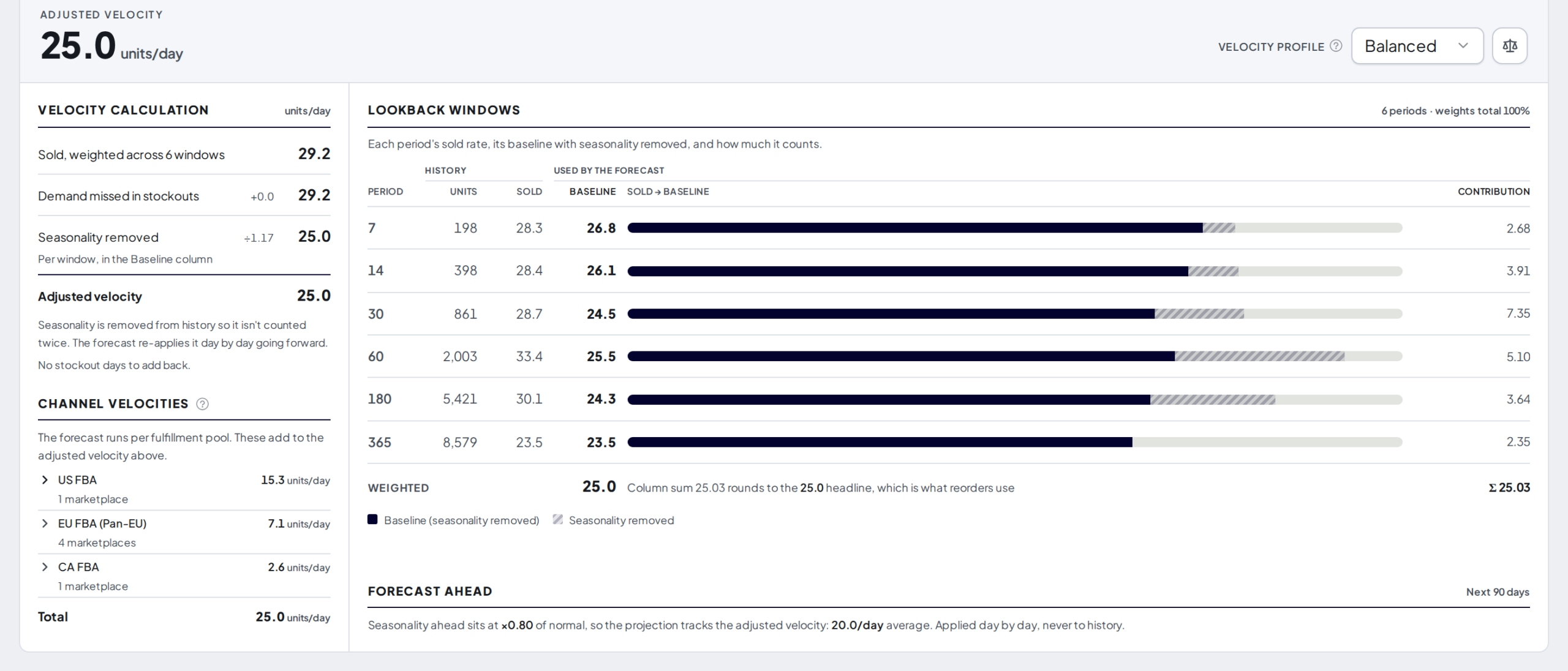
A seller checked our arithmetic and it did not add up. Their six lookback windows averaged 6.1 units a day, the headline said 5.5, and nothing on screen explained the gap. The answer was seasonality being divided back out of their history, which we were doing correctly and showing nowhere.
The Sales Velocity panel and the hover card now lay out the whole calculation:
- Sold, weighted across your windows, then demand missed in stockouts, then seasonality removed, then the adjusted velocity your reorders actually use
- Every step shows even when it changes nothing, at
+0.0or÷1.00, so you can see that stockouts and seasonality were both checked rather than skipped - A new Baseline column shows each window with seasonality removed, and a Contribution column shows what each window adds to the headline, so you can check the total by hand
- Each window's bar is split into what sold, what stockouts added back, and how much was season
We also fixed a wrong explanation. The old hover card blamed the drop on stockouts, which cannot happen, because filling in stockout days only ever raises your velocity.
Learn more: How Forecasting Works
Update a whole warehouse from a spreadsheet
Counting a 3PL's stock one cell at a time is over. Export any external warehouse to Excel from its own page, edit the quantities, and import the file back to update every product at once.
- Overwrite quantities replaces the on-hand count for each product in the file, for a physical count or a fresh stock take
- Receive units adds the file's numbers to what is already there, for a shipment that just landed
- An optional checkbox empties anything the file leaves out, so a complete stock take can zero the products it does not list
- Products in your catalog but not yet in the warehouse are added for you
Nothing is written until you confirm. The review step runs the import for real without saving it, so the counts you approve are the counts you get, and any row it cannot read is listed with the reason. If the warehouse changes while you are reviewing, Profit Hawk refreshes the numbers and asks again rather than applying a stale plan.
AWD warehouses can be exported but not imported. Those numbers come straight from Amazon.
Learn more: Update Warehouse Stock from a Spreadsheet
Transfer recommendations now count stock that is on its way
A transfer recommendation used to be capped by what your warehouse holds today, so a purchase order arriving in nine days changed nothing until the day it checked in. Now purchase orders heading for that warehouse, landing inside a window you choose, count toward the recommendation, and the Transfer Qty cell shows you the split.
- Now is how much of the recommendation comes from stock you can ship today
- A dated line shows how much of it you are waiting on. Hover it for the arrival date, quantity, and PO number of each shipment.
- Total is the recommended quantity, and the two lines above always add up to it, because both are parts of it rather than a stock count
Seeing both halves is the point: "move 200 units today" next to "another 480 land on 3 September" is what lets you decide between one transfer now and two later. Stock arriving after the window is greyed out with its real date, so a small recommendation explains itself instead of just looking wrong.
Set your window under Settings > Forecast Settings > Replenishment Recommendation Settings. Choose 7, 14, or 30 days; it starts at 14.
Learn more: What the Transfer Qty cell shows
Your Est. arrival date is now the date the forecast plans around
Est. arrival on a purchase order used to be for reading. The forecast ignored it and worked out its own arrival from the ship date and your lead times. It now plans around the date on the order, and on an order heading for a warehouse that date is what decides whether the stock counts inside your Inbound PO Window.
Two things follow from that, worth knowing before you notice them:
- A date you type is kept. When your freight forwarder confirms a delivery date, put it in and Profit Hawk plans around it. Make sure it is the arrival date, not the departure date, which belongs in Est. ship. Once you set it, Profit Hawk stops filling the field in for you. To hand the calculation back, empty the date box and click Apply.
- Changing a supplier lead time no longer moves the ETA on orders you have already raised. Previously that recalculated on every open order. Now a stored date moves when the order's ship date, route, or products change, and lead time edits apply to orders you create afterwards. To change one order, edit its Est. arrival directly.
On FBA via 3PL/warehouse orders the field is now labeled Est. FBA arrival, because it describes the FBA check-in rather than the 3PL delivery.
Learn more: Purchase order header fields
Turn on a whole group of columns without ticking every box
Hover a group in the Columns panel and a Select all action appears at the right edge of its row. Click it to show every column in that group, or Clear all to hide them once they are all on. It works on a single pool such as All Pools or UK, and on a whole section such as Inventory Health.
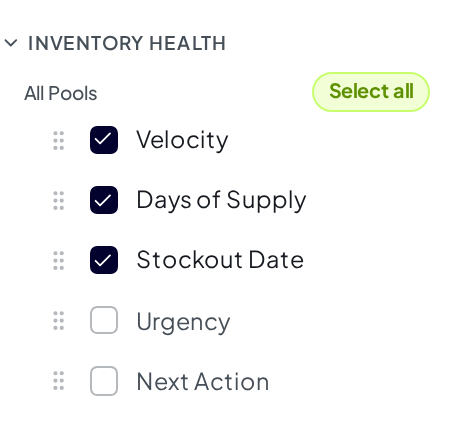
A section can hold dozens of columns, so a bulk change comes with an Undo button in the toast.
Learn more: Inventory Overview
Re-export a purchase order and get the prices you actually sent
Exporting a purchase order used to re-calculate every line from scratch, so a PDF you downloaded again a month later could show different prices than the copy your supplier received, because a cost had changed or exchange rates had moved in between. Now exporting records the price printed on each line, and every later export reproduces it.
- Drafts still follow your current costs and today's rates while you work on them
- Once you export, the prices hold. Adding a cost, correcting an old one, or re-uploading your cost spreadsheet all leave a sent order alone.
- To change a price on an order you have sent, edit that line's Unit cost
- Complete and Archived orders are finished documents, so their costs and PO date can no longer be changed
Learn more: Creating Purchase Orders
See your combined totals in the currency you actually think in
If you sell in more than one marketplace, any total that spanned them used to add currencies together as though they were the same money. Now you pick a display currency once in Organization Settings, and every combined total is converted into it at published exchange rates.
Drag the slider to compare the same dashboard in US dollars and in British pounds:


- Revenue, ad spend, inventory value, profit, fees, and purchase order totals all follow your choice
- Unit counts stay counts. Orders reads 4,763 in both images above, because units are not money
- Dashboard charts convert each day at that day's rate, so last month keeps its value as rates move
- Figures that belong to a single channel, such as Amazon's storage and removal rate cards, stay in that channel's own currency and say so
Learn more: Account Settings
Update a few cost rows without re-uploading your whole catalog
The cost import now asks how your spreadsheet should be applied. Merge treats your file as a patch, updating only the rows it lists and leaving the rest of each product's cost history alone, so correcting one wrong cost across 50 products takes a 50-row file instead of a full export.
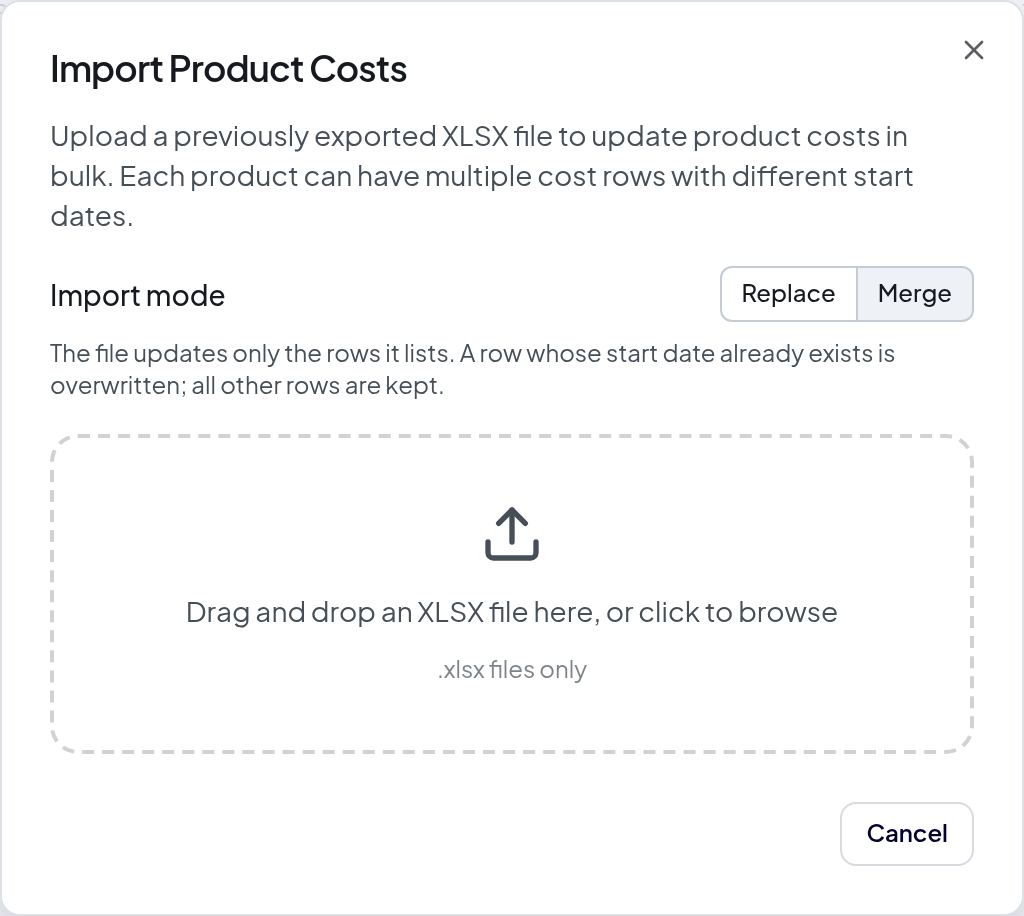
Replace stays the default and works exactly as before, treating your file as the full cost history for every product it lists.
Learn more: Product Costs
Jump straight to the products that are missing a setting
The Products table has a new Preset dropdown next to the search box. Pick a preset and the table narrows to just those products, with a count beside each one so you can see how much work is left before you commit to it.
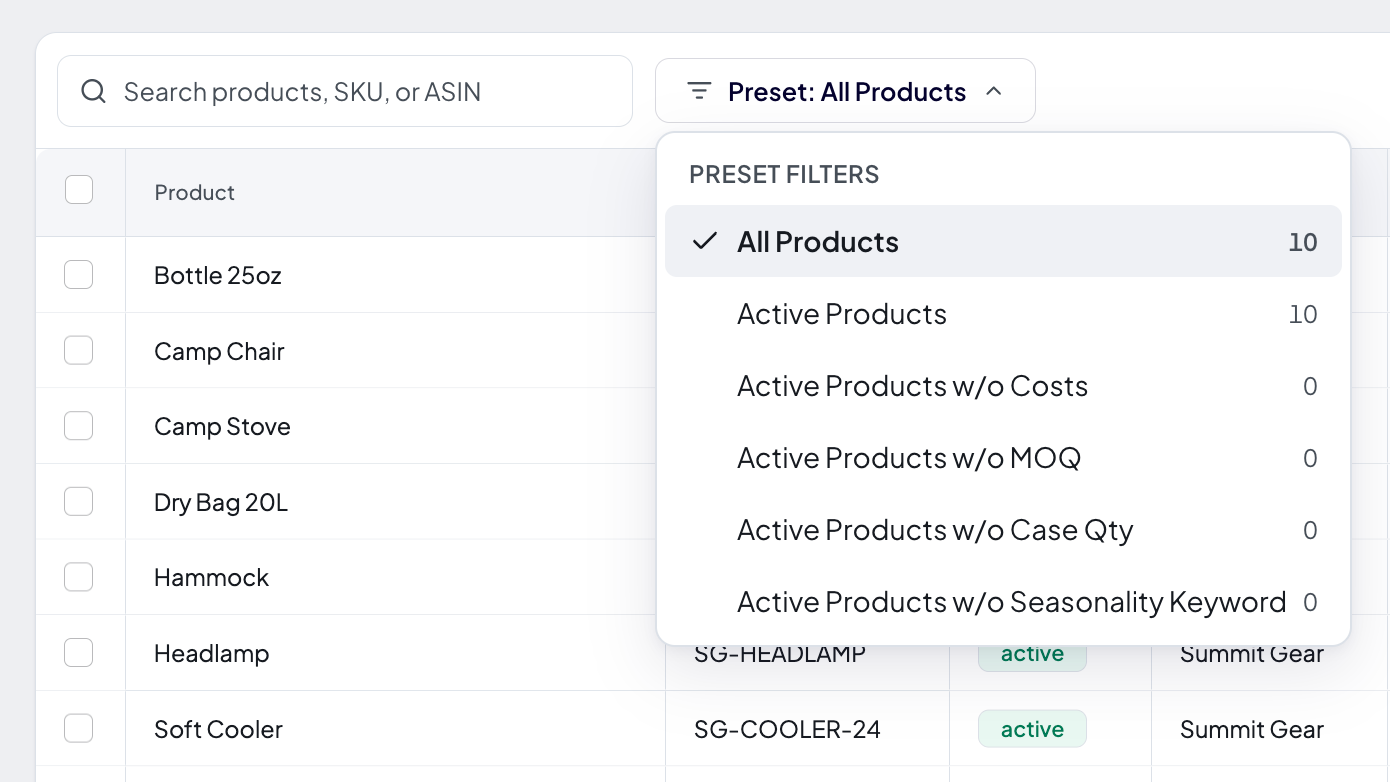
- Products Without Costs, Products Without MOQ, Products Without Case Pack, and Products Without Seasonality Keyword find the gaps that quietly hold back your profit numbers and supplier order quantities
- All Products and Active Products cover everyday use
- Presets filter your whole catalog, not just the rows on screen, and the counts follow whatever you have typed in the search box
- Your selected preset stays in the page URL, so you can bookmark a filtered view or send it to a teammate
Search on the same table now matches your channel listing SKUs and ASINs as well. Paste a value straight out of Seller Central and you land on the product it rolls up into, even when that product's own SKU is different.
Learn more: Finding products
Removal cost estimates now cover your international channels
The Action fees column and the Aged tab used to estimate removal costs on US channels only. They now price 22 marketplaces, each from its own rate card in its own local currency, so a UK, German, or Japanese SKU gets a real figure instead of a dash.
- Where Amazon has waived removal fees, you see a real zero labelled as waived, with its end date, rather than a dash
- Disposal is priced on a separate schedule that only matches removal in the US, so outside the US you get a removal estimate and a dash for disposal
- Where an estimate would mean guessing (no size tier, no shipping weight, or a marketplace we do not have rates for), you still get a dash and can type in the fee Seller Central quotes you
Learn more: Estimating removal and disposal costs
See whether removing aged stock beats paying the surcharge, and by how much
Products have a new Aged tab that turns the analyzer's warning into a decision. It prices keeping everything against removing, picks the quantity with the lowest total cost, and shows your monthly Amazon bill under whichever plan you choose. Click any SKU in the Aged Inventory Analyzer or any removal recommendation in the Storage Breakdown and it opens straight there, on the channel you were viewing.
- Keep everything matches the SKU's Lifetime fees in the analyzer, so the comparison starts from a number you already trust
- A guardrail checks your quantity against your Max FBA Days setting and caps the recommendation so removing never causes a stockout
- Total cost includes buying the removed demand back later at your landed cost, not just the removal invoice
- Advanced levers let you test the plan against a sales change or extra ad spend, with the lift derived from the SKU's own return on ad spend
Learn more: Deciding How Much Aged Stock to Remove
See what it costs to get aged stock out, right next to what it costs to keep it
The Aged Inventory Analyzer has a new Action fees column beside Surcharge /mo. For each SKU it estimates the per-unit cost of a Removal order (units shipped back to you) and a Disposal order (units destroyed), so you can weigh a one-time exit cost against the surcharge you keep paying every month.
- Estimates come from Amazon's published US fee schedule, priced from each product's size tier and shipping weight
- Multiply the per-unit fee by the SKU's aged units to compare it with the Lifetime fees already in the table
- Non-US channels show a dash, since removal rates vary by marketplace
Learn more: Estimating removal and disposal costs
Track which of your ordered units are already on the way
Every purchase and transfer order now has a Shipments tab. Link the FBA and AWD shipments you already created in Seller Central to the order, and Profit Hawk tracks its inbound coverage: how many of the units you ordered are already in a shipment, and how many are still to go.
- Open the order's Shipments tab and click Associate existing to pick from the shipments that share a SKU with the order. A suggested view highlights the shipments created close to the order's ship date; toggle it off to see every eligible one.
- Coverage is counted per product against what you ordered, so an over-shipped SKU never hides another product that has nothing inbound yet.
- Each line's detail panel shows its own inbound coverage, including how many units are not yet in a shipment.
- Linking shipments to a draft order offers to set it Active, the same one-step prompt you get when exporting a PO.
Learn more: Linking Shipments to an Order
Build orders around how your inventory actually moves
Purchase and transfer orders got a ground-up upgrade. When you create an order, you now pick the routing first — supplier direct to FBA, supplier to a 3PL that forwards to FBA, supplier to a single warehouse, or a transfer of your own stock into FBA — and Profit Hawk sizes and splits the order for those destinations.
- Pool-aware destinations. Orders target fulfillment pools, so Pan-EU and NARF sellers pick one destination per pool instead of juggling per-marketplace rows.
- A real order document. Each order now opens as a document — supplier, ship-to, bill-to, payment terms, and dates up top, line items with editable unit costs below, and running totals that always match the PDF. Click any column header to sort the lines, and the order holds steady while you edit costs so rows never jump around.
- A line detail panel. Click any line to see its live health (velocity, days of supply, projected stockout, urgency, on hand) scoped to the order's destinations, plus a frozen forecast snapshot of why it was ordered, and adjust the per-destination shipment split right there — with a warning when a split drops below Amazon's recommended 5 cases per marketplace.
- A routing-aware PDF for every order. Purchase orders export a supplier PDF, and transfers export a pick-list PDF for whoever pulls the stock. The ship-to follows the routing (Amazon FBA, or the warehouse that forwards to FBA), and each PDF has a per-destination breakdown page.
- Export & activate in one step. Exporting a draft's PDF can set the order Active at the same time, so your forecasts start counting the incoming inventory the moment you send a PO to your supplier or start prepping a transfer.
Learn more: Creating Purchase Orders and Creating Transfer Orders.
Sort your Sales, Traffic, and Ads columns by the date range you choose
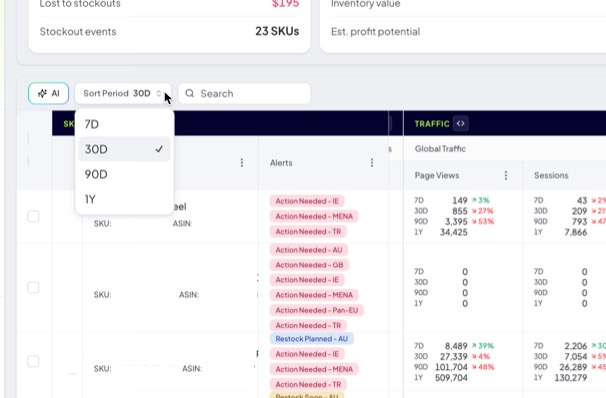
Based on your feedback, sorting the columns that stack 7D, 30D, 90D, and 1Y in one cell is now clear. Click a metric header (like Amazon Revenue or Page Views), pick the range you want to rank by, and the table sorts by that metric over that range.
Drag the slider to compare the before and after:
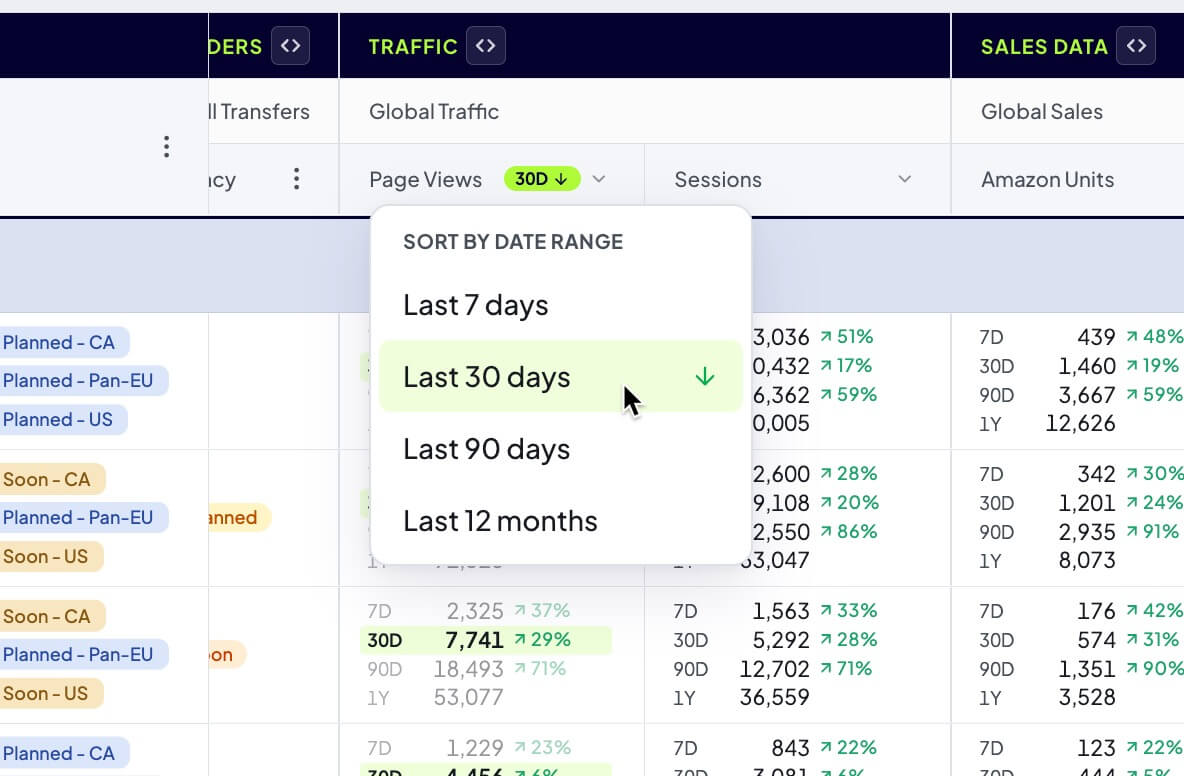
- The sorted column shows a badge with the active range and direction, and every cell highlights that range and dims the other three, so you always know what the order is based on
- Click the same range again to flip between highest first and lowest first, or click a different metric to move the sort
- This replaces the old Sort Period dropdown, which changed the order without showing you what it was doing
Learn more: Sort by date range
Group your inbound shipments by status or marketplace
The Inbound Shipments table can now group related shipments into collapsible bands instead of one long list. Use the Group by control in the toolbar to switch between None, Status, and Marketplace, on both the FBA and AWD tabs.
- Each band shows a running shipment count and the group's total unreceived units and unreceived value, so you can see where your in-transit inventory and dollars are concentrated
- Status keeps the most urgent shipments (Ready to Ship, In Transit) at the top; Marketplace rolls everything up by country
- Your grouping choice is saved in the page link, so you can bookmark or share the exact view
Learn more: Inbound Shipments
Get emailed when your keyword request is reviewed
You no longer have to check back to see whether a seasonality keyword you requested went through. As soon as we review your request, we email you at the address on your account with the outcome.
- Ready to use: we pulled the search-volume data, so you can set the keyword as a product's primary keyword for seasonality
- Not enough data: there was not enough search history to build a reliable seasonality profile, so you can reply to the email and we can help you find alternative keywords that capture the same seasonal demand
Learn more: Product Settings
See your catalog grouped by how important each product is to keep in stock
The Inventory Overview now groups your products into Replenishment Priority tiers, so the products that matter most sit together at the top. Each tier band rolls up its own totals, how many SKUs it holds, how many are at risk, its inventory value, and its share of your value and revenue, so you can see where your stock and your risk are concentrated at a glance.
- Grouping is on by default. Use the Group by control in the toolbar to switch between Priority and None.
- Priority is a stocking-strategy classification (A - Critical, B - Standard, C - Long-tail), not a "reorder right now" signal. It sets how large a safety-stock buffer Profit Hawk holds for each product. Hover the info icon on any tier band for a reminder.
Learn more: Group products by Replenishment Priority
Edit replenishment tier, velocity, and coverage across products at once
The Edit Products dialog now covers the settings that drive forecasting and reordering, not just brand and quantities. Select any group of products on the Products tab, click Edit Products, and update them all in one go.
- Set the Replenishment Tier (A, B, or C) for the whole selection, or choose Use Profit Hawk recommendation to apply each product's own recommended tier
- Set the Velocity Profile, Coverage Days, and Max FBA Days in bulk alongside brand, status, and order quantities
- Anything you leave blank keeps each product's current value
Learn more: Product Settings
Edit product settings in Excel with just the columns you need
The product settings import now matches columns by their header, so you can delete the columns you are not changing and keep only the ones you want to update. Every column you remove is left untouched, and you can reorder columns however you like.
- Keep the SKU column so Profit Hawk can match each row back to a product
- Keep grouped columns together (all of the lead time columns, or all of the custom velocity weight columns). If only part of a group is present, the import tells you which columns are missing instead of changing anything
Learn more: Product Settings
See the orders behind each reorder, and stop double-counting units already shipped
The Open POs and Open TOs columns in the Inventory Overview now split into an Active line and a Draft line, so you can tell orders you have placed from ones you are still planning. Hover any open-order number (or the Order Qty) to see the individual orders behind it, grouped by status with their dates and quantities. Click an order to jump straight to its plan.
- When an active order has already shipped units into Amazon's network, the tooltip reconciles the math for you: planned Total, Already Shipped, and Net Pending still on the way
- Those in-transit units are now counted only once, so a reorder recommendation no longer overlaps an open order with inbound inventory
- Draft orders are shown for reference but never suppress a reorder you actually need
Learn more: Replenishment Recommendations
See which products are exempt from Amazon's low-inventory-level fee
The Inventory Overview has a new Low-Inventory Fee column that shows, at a glance, whether each product's FBA listings are exempt from Amazon's low-inventory-level fee. Instead of checking Seller Central listing by listing, you can spot the products that are exposed to the fee right in your table.
- One badge per product: Exempt, Not exempt, Mixed (exempt in some marketplaces, not in others), or a dash when Amazon has not reported a status
- Hover the badge for the per-marketplace breakdown, with pooled programs rolled up into a single entry (US (NARF), Pan-EU) instead of one row per marketplace
- Expand the Current Inventory group to get a Fee column per marketplace, so you can compare and sort exposure channel by channel
Learn more: Low-Inventory Fee
Set seasonality keywords in bulk from the Excel import
The product settings export now includes a Seasonality Keyword column, so you can assign each product's primary keyword for seasonality in bulk instead of one product at a time. Edit the column in your spreadsheet and import it back like any other setting.
- If a keyword you enter is not in Profit Hawk yet, the rest of that product's settings still import, and Profit Hawk shows you which keywords it could not find
- Click Request keywords to submit the missing ones for review in one step
- Extra spaces around a keyword are trimmed automatically, so a stray space will not stop it from matching
Learn more: Product Settings
Set a default view, edit saved views in place, and find the Views panel faster
The Views panel in the Inventory Overview picked up three upgrades. You can now choose a view that loads automatically when you open the page, edit a saved view instead of deleting and recreating it, and spot the panel more easily now that it stands out in the left rail.
- Set your default view. Click the star on any built-in or saved view to make it your personal default. It loads every time you open the Inventory Overview, and your default is yours alone, so teammates set their own.
- Edit a saved view. Rename a view, or overwrite it with your current filters, columns, and sort, without starting over. When a saved view is active, Save current view lets you update it or save your setup as a new view.
- Easier to find. The Views panel is highlighted in the left rail, so it is easy to spot even though the panel starts collapsed to give your table more room.
Learn more: Saved Views
Copy a product's SKU or ASIN straight from the inventory tables
Based on your feedback, copying a product's identifiers now takes one click. Hover a product's SKU or ASIN in the Inventory Overview or the Aged Inventory Analyzer and a copy button appears. Click it to copy the value to your clipboard, with a quick check mark to confirm. The ASIN now sits right next to the SKU, so it is ready to paste into Amazon's ad console or Seller Central without hunting for it.
- The SKU and ASIN can be copied individually, so you grab exactly the one you need
- Table search now matches on ASIN too, so you can find a product by the ID you just copied
Learn more: Inventory Overview and Aged Inventory Analyzer
Storage Breakdown and the Aged Inventory Analyzer remember your last channel
If you sell in a marketplace other than the US, you no longer have to reset the sales channel picker every time you open these pages. Both pages now remember the channel you selected last and share that choice, so switching to Canada (or any other channel) on one carries straight over to the other, and it is still there when you come back.
- Your choice is saved in your browser, so it sticks across page reloads and future visits
- The two pages share one remembered channel, so you set it once for both
Learn more: Storage Breakdown and Aged Inventory Analyzer
Project your peak-season storage bill and cut it before rates flip
Amazon's US FBA storage rates roughly triple from October through December (other marketplaces set their own rates, projected from Amazon's own estimates for your account). The new Storage Breakdown page projects what the peak quarter will cost under your current stock plan and shows exactly where that money sits: a to-scale treemap of your stored cube colors every SKU by whether it earns its rent, is borderline, would be cheaper in AWD, or pays more rent than it earns.
- A monthly chart stacks base storage and the aged-inventory surcharge in every bar, for both your billed history and the projected months ahead
- The projection includes what is on the way: open inbound shipments land at Amazon's delivery-window ETA, and your active purchase and transfer orders land at their estimated arrival dates, all listed in an Inbound & POs card (click a shipment in it to jump to its detail page)
- A worst-rent-ratios list ranks the SKUs paying the most storage per dollar of profit they earn during peak
- View-only recommended actions (removals, coupon drawdowns, AWD holding) each carry estimated savings and a do-by date, including removal deadlines timed to Amazon's monthly aged-inventory snapshot
- US channels also get the current 2026 peak rate card, and projections are calibrated against Amazon's own storage cost estimates for your account
Learn more: Storage Breakdown
See what your aged stock will cost if nothing changes
Based on your feedback, the Aged Inventory Analyzer now projects Amazon's aged-inventory surcharge forward, month by month, until your aged stock sells out at its current sales pace. A new fee schedule panel shows the projected lifetime total for the channel, cumulative checkpoints at 30 days and at 6, 12, 24, and 36 months, and a month-by-month chart colored by age band. Two new table columns show each SKU's 12-month fee runway and its projected lifetime fees, so you can rank problems by their total future cost instead of just this month's bill.

- Hover any bar in the chart to see that month's total and its breakdown by age band
- A "+" on any total means that stock will not sell out within 36 months at the current pace, so fees keep accruing beyond what is shown
- Group headers now also total the projected lifetime fees for each recommended action
Learn more: Aged Inventory Analyzer
Save your own filtered views and scan the Inventory Overview more easily
You can now save your current filters, sort order, and column layout as a named view, then switch between your saved views and the built-in ones (Restock Needed, Transfer Needed, Out of Stock, In Stock) in one click from the new left-hand Views panel. Saved views are shared with your team, so everyone can work from the same setups. The rest of the Inventory Overview also got a usability refresh that makes it faster to read and navigate.
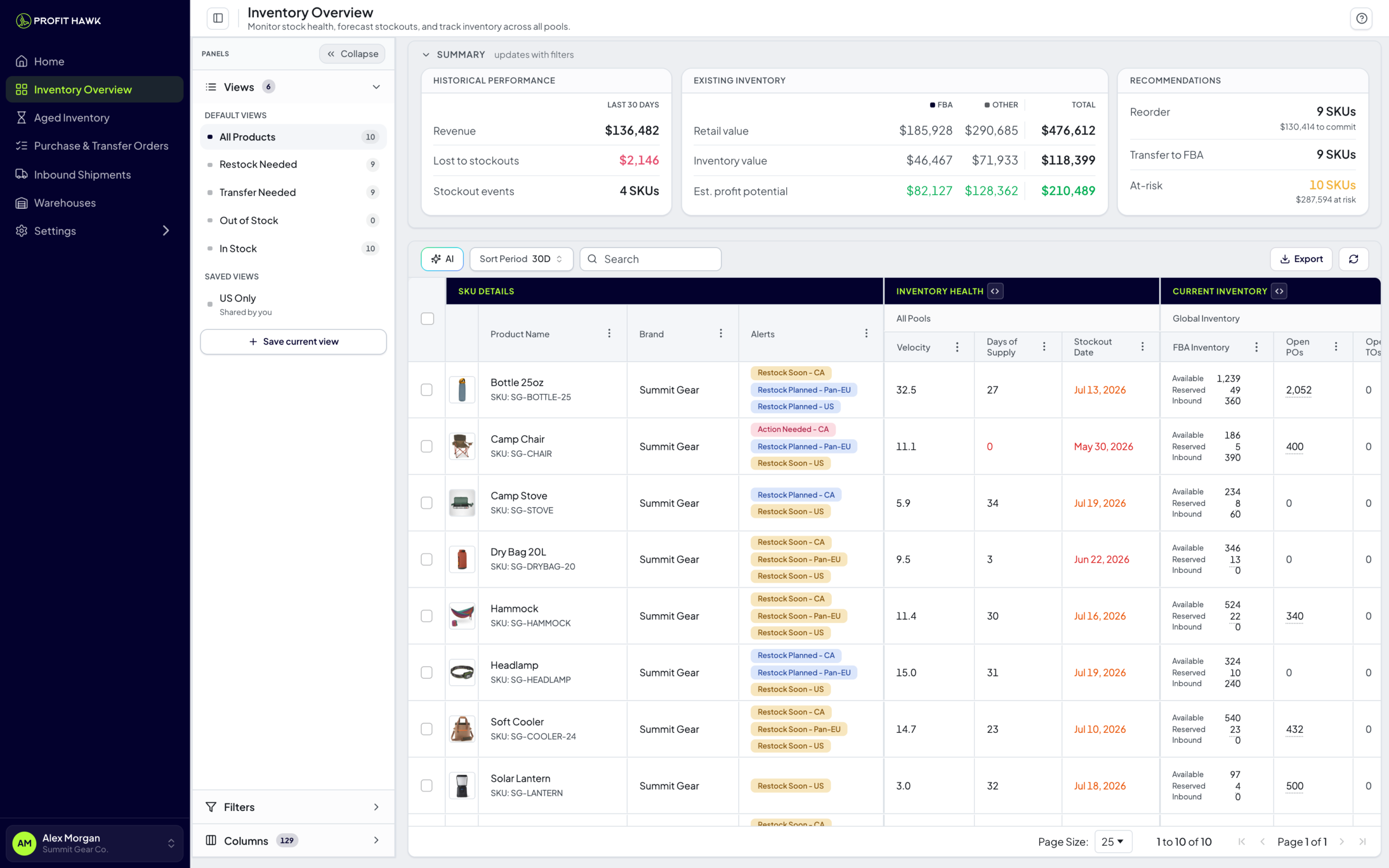
- Save and reuse custom views: your filters, sort order, and visible columns are all captured together
- Build filters and manage columns from the same collapsible side panel, which tucks into a slim rail to give the table more room
- The leading product columns (image, product name, brand, and alerts) are now grouped under a "SKU Details" header and stay pinned as you scroll sideways
- A refreshed color palette and higher-contrast text make the table and its grouped headers easier to scan
Learn more: Inventory Overview
See suggested reorders broken down by inventory pool
You can now expand the Suggested Supplier Reorders columns on the Inventory Overview to see quantities, costs, estimated profit, and urgency per inventory pool (for example UK FBA under MENA remote fulfillment, NARF in North America, or Pan-EU), matching how Inventory Health already breaks down. Hovering Est. Profit also groups marketplaces under their shared pool header, so it is clear which marketplaces draw from the same stock.
- Accounts with no 3PL or AWD no longer see an empty Suggested Transfer Orders group, and the Transfer tab is hidden when there is nothing to transfer
- Restock plans keep their per-warehouse breakdown, since plan edits are saved per warehouse
Learn more: Inventory Overview
Catch Amazon aged-inventory surcharges before they pile up
You can now triage aging FBA stock from one screen. The new Aged Inventory Analyzer shows every SKU that is being charged Amazon's monthly aged-inventory surcharge (or is about to be), how much cash is tied up in that aging stock, and a recommended next action for each one, sorted so the most expensive problems are at the top.
- See your surcharge at stake, cash tied up, and at-risk SKU counts at a glance
- A per-SKU breakdown across Amazon's age bands, with the 271-day cliff called out
- A clear next action for every SKU: liquidate, advertise, cut price, or leave it alone
- Works per sales channel in local currency, including a combined Pan-EU pool
Learn more: Aged Inventory Analyzer
See where your inventory cash is tied up at a glance
A new pie chart on the dashboard breaks down how much cash you currently have locked up in inventory, product by product. The top 10 products show as individual slices, and the rest roll up into a single "Other (N)" slice, where N is the number of grouped products. Every slice shows both the dollar amount and the percent of your total. Use it to spot which products are eating the majority of your working capital so you can prioritize what to reorder, slow down on, or promote.
Learn more: Total Inventory Value by Product
Find any product with plain English
Stop clicking through filters. Just type what you need ("show me products running low" or "items with no sales in 30 days") and the inventory table updates instantly. Profit Hawk translates your question into the right filters behind the scenes, so you get answers without building complex filter chains. We also added timeframe-scoped filters and inventory sub-type filters so you can slice your data in ways that weren't possible before.
Learn more: Filtering & Searching
A completely redesigned Inventory Overview
The Inventory Overview got a major facelift. You now get tabbed views (All Products, Restock Needed, Transfer Needed, Out of Stock, In Stock) so you can jump straight to what matters. Summary cards at the top show transfers needed, supplier orders due, at-risk products, and estimated lost revenue at a glance. Metrics across 7d, 30d, 90d, and 1y now stack into a single column with trend percentages, so you can spot what is going up or down without scrolling sideways. Country flag icons on marketplace columns make multi-marketplace accounts easier to scan, and we removed the old 100-product limit so your full catalog loads fast.
Learn more: Inventory Overview
Smarter replenishment with warehouse-specific lead times
You can now set transfer lead times for each warehouse-to-marketplace combination, so the replenishment engine knows exactly how long it takes to move inventory from your 3PL in California to FBA US versus your warehouse in Germany to FBA UK. Estimated arrival dates now show up on supplier reorders and transfer orders, giving you a clear picture of when inventory will land. Lead times also save with an explicit Save button instead of auto-saving, so you can review your changes before committing them.
Learn more: How Forecasting Works
Request any keyword for seasonality tracking
Can't find the keyword you need on the seasonality chart? Now you can request it directly from the dropdown. Once approved, Profit Hawk pulls two years of search volume data and computes seasonality indices automatically, so you can see exactly when demand spikes for your products and plan inventory accordingly.
Connect your Amazon Warehousing & Distribution account
If you use Amazon AWD, Profit Hawk now syncs your AWD inventory and inbound shipments automatically. AWD inventory shows up in your Inventory Overview alongside FBA and external warehouse quantities, and AWD inbound shipments get their own tab on the Inbound Shipments page. The replenishment engine factors in AWD in-transit units to prevent double-ordering. Non-Amazon (MCF) units are now broken out from Amazon units in your sales columns, so you can see exactly where orders are coming from.
Learn more: Amazon AWD
Control whether non-Amazon orders affect your forecast
If you fulfill orders from Shopify, eBay, or other channels through Amazon MCF, you can now toggle whether those orders count toward your demand forecast. This is per sales channel, so you get precise control over what drives your reorder recommendations.
Bulk update product costs and settings via spreadsheet
Managing costs and settings one product at a time is painful when you have hundreds of SKUs. Now you can export your product costs or product settings as an XLSX file, make changes in your spreadsheet app, and import the file back. Profit Hawk previews every change before applying it, so you can catch mistakes before they go live. Exports also include default lead times and stock level defaults.
Select all products across every page at once
Bulk actions just got a lot faster. When you check the "select all" box in any table, you can now extend your selection to every row across all pages, not just the current page. Clear messaging tells you exactly how many items are selected, so you always know what you are working with.
Learn more: Bulk Actions & Restock Plans
Build purchase orders and transfer orders right inside Profit Hawk
No more spreadsheets for ordering. Create purchase orders (for suppliers) and transfer orders (warehouse to FBA) directly from the replenishment recommendations. Each order gets an auto-generated PO or TO number, supports multiple destinations, and lets you add/remove products, edit quantities per fulfillment pool, and attach notes. Active orders are automatically factored into your replenishment forecast, so the engine won't recommend reordering inventory that is already on the way.
Learn more: Creating Purchase Orders
Cleaner settings and a fresh login experience
The settings menu is now split into Organization Settings and Personal Settings, so you can find what you need faster. We renamed "Data Sources" to "Sales Channels" to better match how sellers think about their Amazon accounts. The signup and login pages got a full visual redesign with a split-screen layout. And the entire app UI now renders at 90% zoom for a more compact, information-dense layout that fits more data on screen.
Demand forecasting and reorder recommendations are here
This is the big one. Profit Hawk now forecasts demand, projects your inventory day by day, and tells you exactly what to reorder, when, and how much. The engine uses weighted sales velocity with trend detection, calculates safety stock based on lead time variability, and generates both transfer recommendations (move inventory from your warehouse to FBA) and supplier order recommendations (reorder from your supplier). You get a full Replenishment Dashboard with three views: Transfers Needed, Supplier Orders, and At Risk. On every product detail page, an inventory projection chart shows forecasted stock levels with stockout zones and reorder points. Velocity presets let you choose the lookback window (7d through 365d) that best matches your product's sales pattern.
Learn more: How Forecasting Works
Configure NARF, EFN, and Pan-EU fulfillment programs
Selling across multiple Amazon marketplaces? Profit Hawk now understands your fulfillment setup. Configure NARF (North America Remote Fulfillment), EFN (European Fulfillment Network), or Pan-EU per sales channel, and the forecast engine pools demand and inventory correctly. NARF combines CA and MX demand against US inventory. EFN pools EU demand against your home country. Pan-EU sums all EU inventory together. No more manually adjusting for cross-border fulfillment.
Track inventory in any warehouse, not just FBA
You can now add your 3PL warehouses, prep centers, or any external storage location to Profit Hawk. Track quantities with inline editing, see a full audit log of every quantity change, and view warehouse inventory right alongside FBA inventory in the Inventory Overview. The replenishment engine uses your warehouse stock levels to recommend transfers to FBA, so you always know what to send and when.
Learn more: External Warehouses
See your advertising performance alongside inventory data
Connect your Amazon Ads account and see Spend, Ad Units Sold, and Ad Revenue columns right in your Inventory Overview, broken down by campaign type (Sponsored Products, Sponsored Display, Sponsored Brands). After linking your Seller Central account, Profit Hawk prompts you to connect Ads so you can start seeing the full picture of how advertising spend relates to inventory levels and sales velocity.
Learn more: Amazon Ads
Product images now appear everywhere
Your inventory tables and product detail pages now show actual product images pulled from your Amazon listings. A weekly sync keeps product metadata (brand, images, parent ASIN, status) up to date automatically, so your catalog in Profit Hawk always matches what is live on Amazon.
Create and manage inbound shipments
You can now create FBA inbound shipments with a guided multi-step flow, edit existing shipment plans, and view detailed breakdowns of every shipment including items, costs, addresses, and status. Filter shipments by status, search by SKU or ASIN, and toggle closed shipments on or off. Shipment item tables now use AG Grid with product detail drawers for quick lookups without leaving the page.
Learn more: Inbound Shipments
Organize products by brand and edit in bulk
Brands are now a proper data model instead of free-form text, so filtering and grouping by brand is consistent across your catalog. Select multiple products with checkboxes to bulk edit or bulk delete, saving you from tedious one-at-a-time changes.