

Welcome to Profit Hawk
Find help articles, setup guides, and troubleshooting resources for Profit Hawk, the inventory management platform for Amazon FBA sellers.
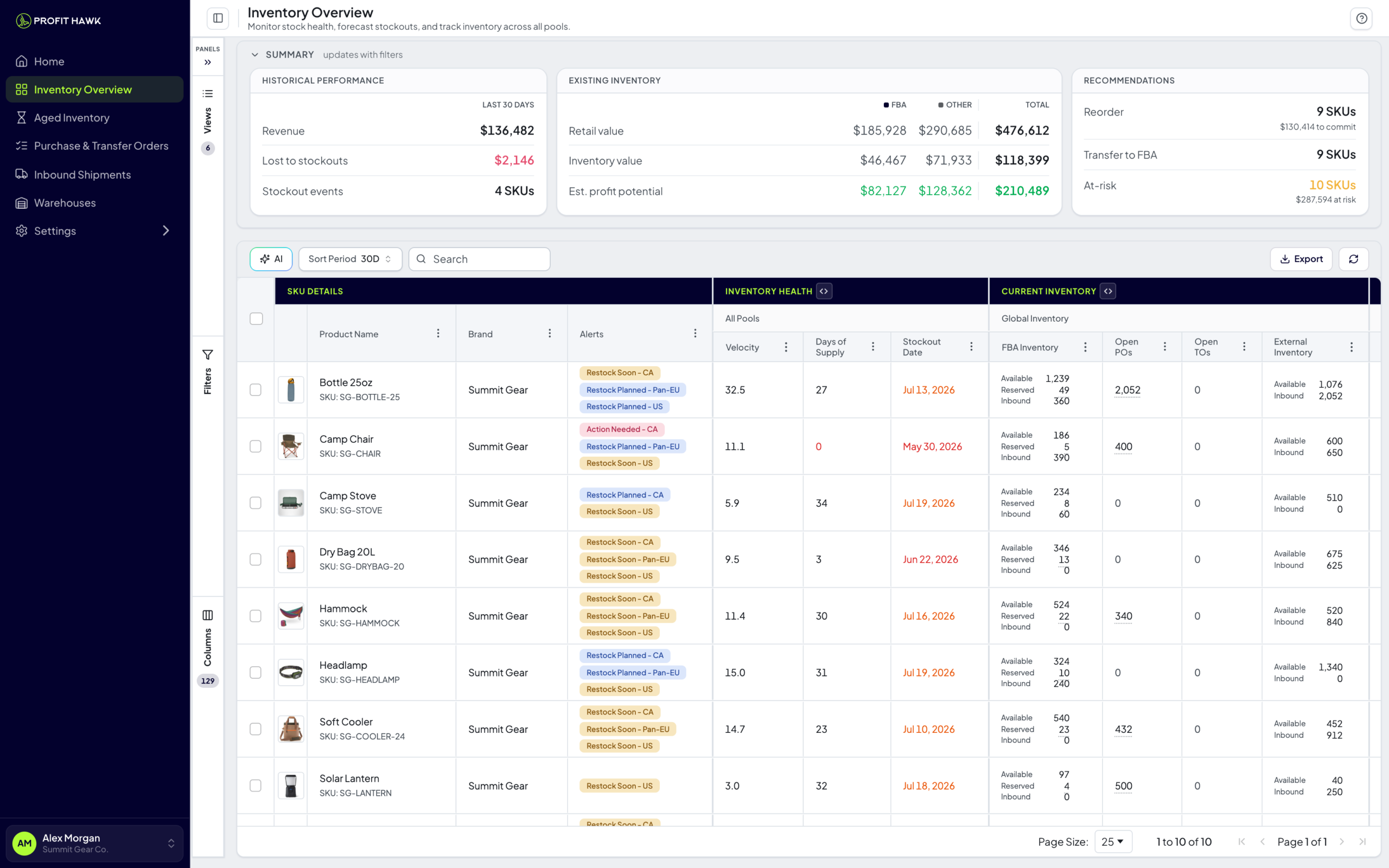
Profit Hawk helps Amazon FBA sellers forecast demand, prevent stockouts, and build smarter purchase orders. This help center has everything you need to get set up and get the most out of the platform.
New here? Start with these
Quickstart Guide
Create your account, connect Amazon, and explore your dashboard in minutes.
Connect Amazon
Link your Seller Central account so Profit Hawk can sync your inventory data.
Key Terms
ASIN, SKU, lead time, MOQ, and other terms you will see throughout Profit Hawk.
The heart of the app
The Inventory Overview is where most Profit Hawk users spend their time. It shows every product, every marketplace, and every reorder recommendation in one place.
Inventory Overview
The main page tour: summary cards, saved view tabs, the inventory table, and what each column means.
Inventory Health & Alerts
Days of supply, urgency levels, and alert badges that tell you what needs attention.
Get things done
Outcome-focused walkthroughs for the workflows that drive your business:
Identify Reorders
Find every product that needs a new supplier order and turn the list into a draft purchase order.
Identify Transfers Needed
Move stock from your warehouse, 3PL, or AWD into FBA before you sell out.
View Excess Inventory
Spot products that are overstocked relative to demand so you can slow reorders or run promotions.
Find Shipments Requiring Reimbursement
Identify shipments where Amazon never received everything you sent.
Explore by feature
Inventory Products
Manage your products, connect channel listings, generate products from listings, and configure settings.
Forecasting & Replenishment
How Profit Hawk predicts demand, calculates safety stock, and generates reorder recommendations.
Purchase & Transfer Orders
Build purchase orders, configure MOQ and case pack rules, and manage your supplier list.
Inbound Shipments
Track shipments to FBA and AWD, monitor unreceived units, and reconcile shortages.
Integrations
Connect Amazon Seller Central, Amazon Ads, AWD, and external warehouses.
Dashboard
Your home page with KPIs, inventory value charts, and at-a-glance reorder counts.
Manage your account
Account Settings
Update your profile and preferences.
Billing & Plans
View your subscription and billing details.
Team Access
Invite team members and manage permissions.
Get help
FAQs
Answers to the most common Profit Hawk questions.
Troubleshooting
Fix sync issues, unexpected forecasts, and other common problems.
Changelog
See what is new in the latest Profit Hawk updates.